Client-side tools#
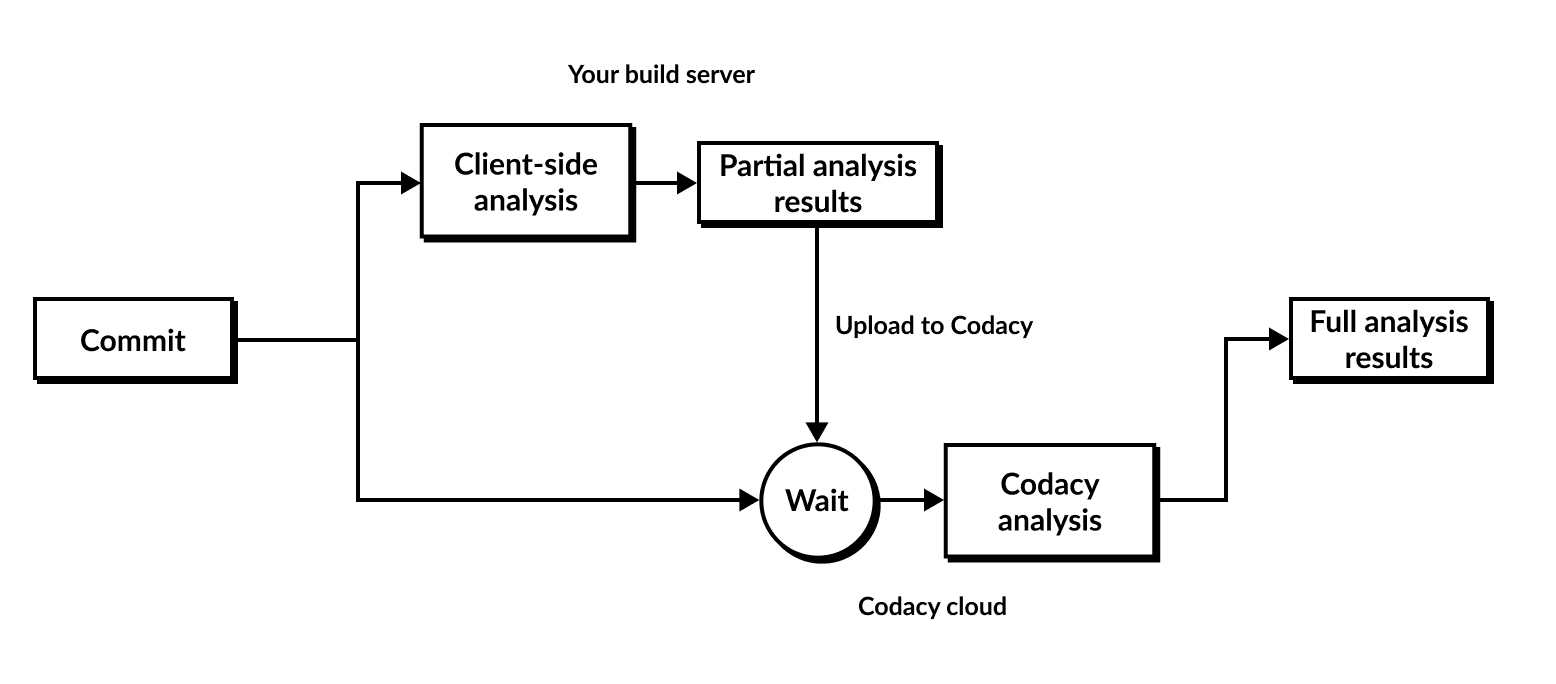
Client-side tools enable you to run an analysis locally or as part of your build process and upload the results to Codacy. This way, Codacy presents the analysis information reported by your local tools on the Codacy dashboards, in addition to the default code quality information.
The following diagram presents a high-level overview of the local analysis flow.
Codacy supports client-side tools in two ways:
-
Containerized tools: Codacy provides Docker images to run analysis tools locally. To fetch code pattern configurations from Codacy, run the images, print out analysis results, and upload them to Codacy, use the Codacy Analysis CLI.
The Codacy Analysis CLI automatically fetches the code pattern settings that you define on the Codacy UI and applies them when running the tools.
-
Standalone tools: Codacy provides auxiliary converters that parse the output of third-party tools and convert to a format that you then upload to Codacy. You must download, configure, and run the third-party tools yourself.
You can't configure these tools on the Codacy UI, since you manage their configuration locally.
Tip
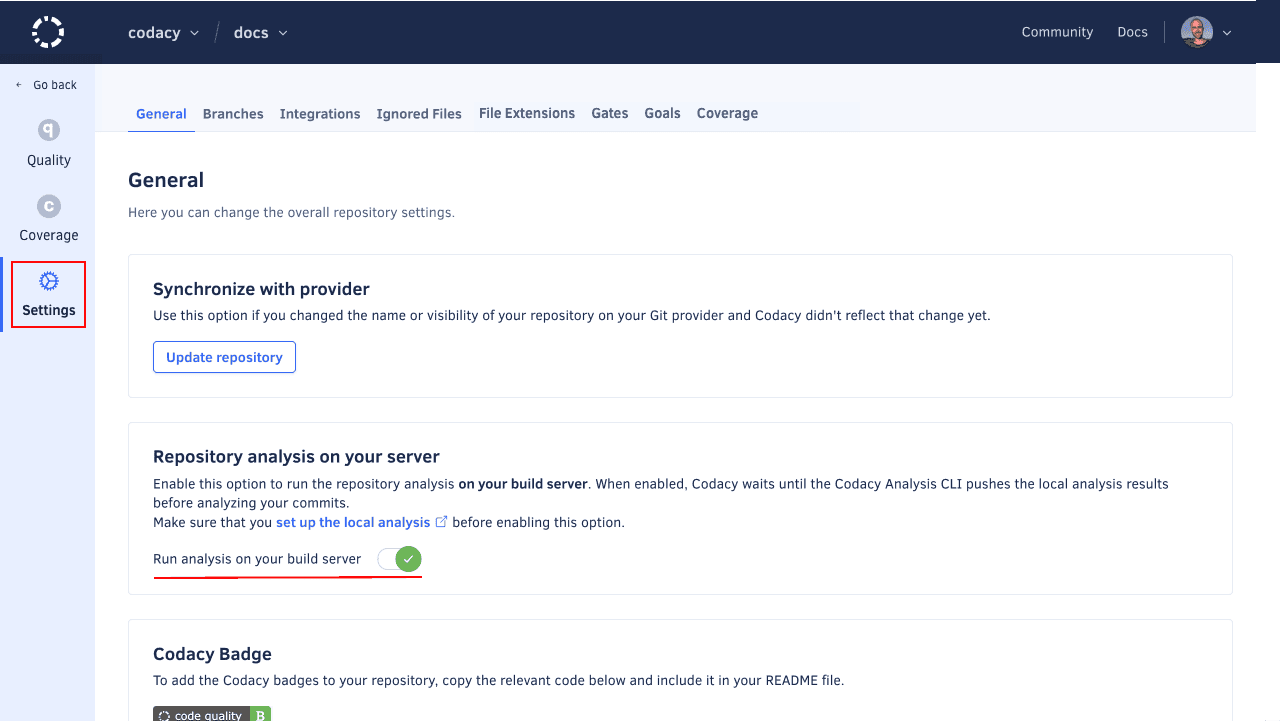
In order to receive results from local analysis, the flag "Run analysis on your build server" must be enabled.
The table below describes the supported client-side tools and includes links to specific instructions on how to run each tool.
Tip
If you're using GitHub we recommend that you use the Codacy Analysis CLI GitHub Action to run the containerized client-side tools and upload the results to Codacy.
| Language | Client-side tool | Description | Usage instructions |
|---|---|---|---|
| C, C++ | Clang-Tidy | Clang-tidy is a clang-based C++ “linter” tool. Its purpose is to provide an extensible framework for diagnosing and fixing typical programming errors, like style violations, interface misuse, or bugs that can be deduced via static analysis. Clang-tidy is modular and provides a convenient interface for writing new checks. | Running Clang-Tidy (standalone) |
| Go | aligncheck | aligncheck is a utility for finding unused struct fields in Go source files. | Running aligncheck (containerized) |
| deadcode | deadcode is a very simple utility which detects unused declarations in Go packages. | Running deadcode (containerized) | |
| GolangCI-Lint | GolangCI-Lint is a fast, parallelized Go linters runner that aggregates dozens of different linters into a single tool, allowing developers to detect bugs, style errors, and complexity issues efficiently in their Go codebases. | Running GolangCI-Lint (standalone) | |
| Gosec | Gosec inspects source code for security problems by scanning the Go AST. | Running Gosec (standalone) | |
| Staticcheck | Staticcheck is a state of the art linter for the Go programming language. Using static analysis, it finds bugs and performance issues, offers simplifications, and enforces style rules. | Running Staticcheck (standalone) | |
| Java, Scala | SpotBugs | SpotBugs is a program which uses static analysis to look for bugs in Java code. Together with the Find Security Bugs plugin it provides security audits. It has support for Maven, sbt, and Gradle in Java projects. | Running SpotBugs (containerized) |
| Objective-C | Clang-Tidy | Clang-tidy is a clang-based C++ "linter" tool. Its purpose is to provide an extensible framework for diagnosing and fixing typical programming errors, like style violations, interface misuse, or bugs that can be deduced via static analysis. Clang-tidy is modular and provides a convenient interface for writing new checks. | Running Clang-Tidy (standalone) |
| Unity | Unity Roslyn Analyzers | Unity-specific diagnostics for CSharp Unity projects. | Running Unity Roslyn Analyzers (standalone) |
See also#
Was this page helpful?
Your feedback helps us improve the documentation.
255 characters left
Thanks for helping improve Codacy documentation.
For more detailed feedback, open an issue on GitHub.