Adjusting quality gates#
The quality gates of your repository configure when Codacy reports your pull requests and commits as not up to standards.
When you add your repository to Codacy, it automatically follows the default gate policy for your organization. If you want to set different quality gates for the repository, create a new organization gate policy to apply to the repository.
Note
Although you can define custom quality gate settings for specific repositories, we recommend that you always use a gate policy defined by your organization to enforce consistent rules across multiple repositories.
Depending on the result of applying the quality gate rules, Codacy updates the color of the metrics on the pull request or commit quality overview and reports the corresponding pull request status on your Git provider, if enabled.
Tip
Integrate Codacy with your Git workflow to report the pull request status to your Git provider and optionally block merging pull requests that aren't up to standards.
To access the quality gates, open your repository Settings, tab Gates.
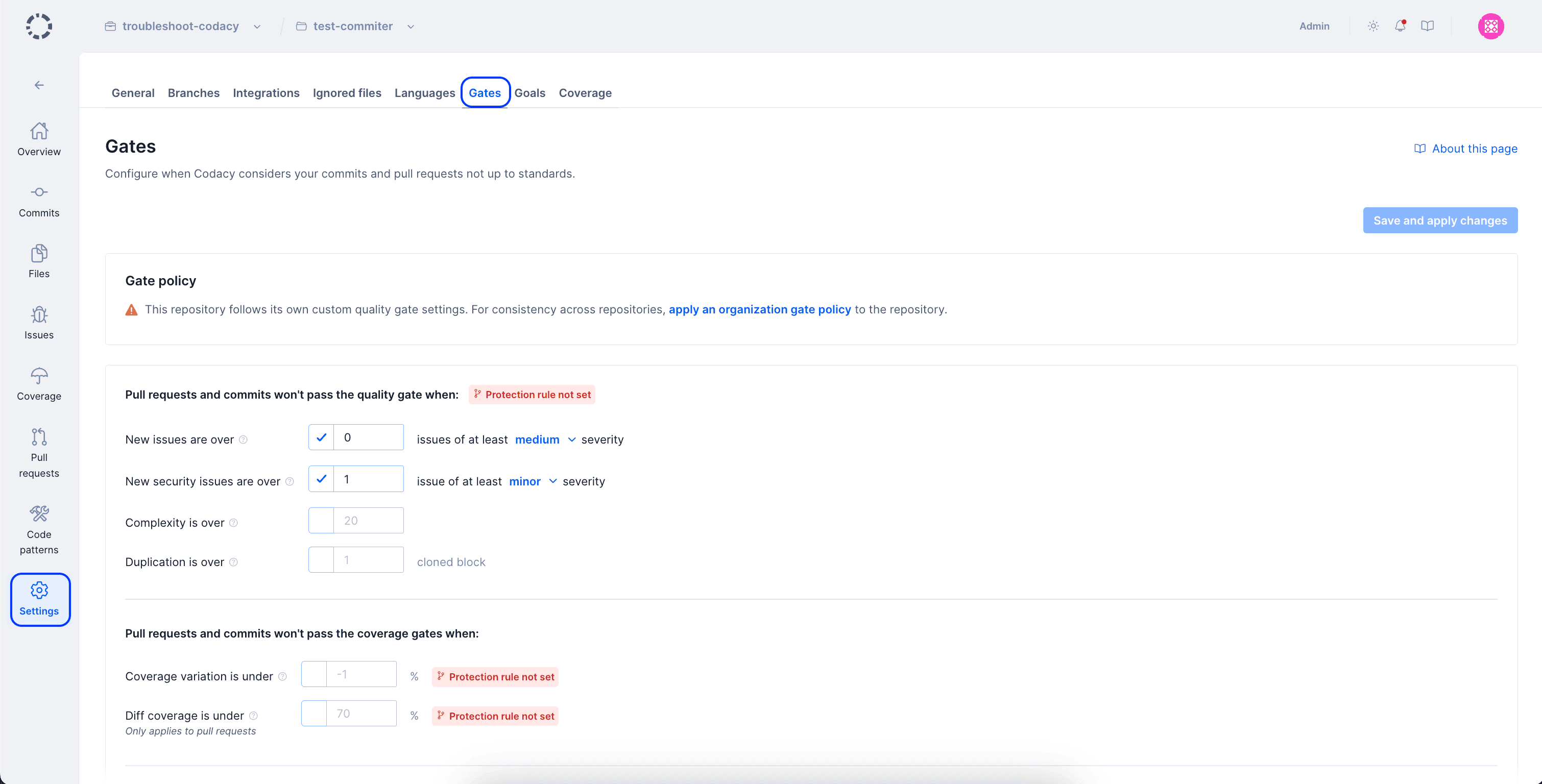
- New issues are over: Pull requests or commits are marked not up to standards if the number of issues introduced that have at least the specified severity level is higher than the set value.
- New security issues are over: Pull requests or commits are marked not up to standards if the number of security issues introduced that have at least the specified severity level is higher than the set value.
- Complexity is over: Pull requests or commits are marked not up to standards if the introduced complexity is higher than the set value.
- Duplication is over: Pull requests or commits are marked not up to standards if the number of clones introduced is higher than the set value.
-
Coverage variation is under: Pull requests or commits are marked not up to standards if they introduce a variation to coverage lower than the set value.
Tip
Set this gate to -0.10% or lower. This will ensure that developers have a coverage drop margin so they aren't blocked while performing some types of code refactors
To ensure that the changes in each pull request have a minimum level of coverage, use the gate Diff coverage is under instead.
-
Diff coverage is under: Pull requests are marked not up to standards if the diff coverage of the pull request is lower than the set value or
∅(not applicable). This rule is only available for pull requests.
See also#
- Which metrics does Codacy calculate?
- Why does Codacy show unexpected coverage changes?
- Integrating Codacy with your Git workflow
Was this page helpful?
Your feedback helps us improve the documentation.
255 characters left
Thanks for helping improve Codacy documentation.
For more detailed feedback, open an issue on GitHub.