Not a member of the organization#
This page applies only to Codacy Cloud
When you see the message Not a member of the organization it means that Codacy Cloud can't analyze a commit because the associated email address doesn't belong to any member or committer of your Codacy organization.
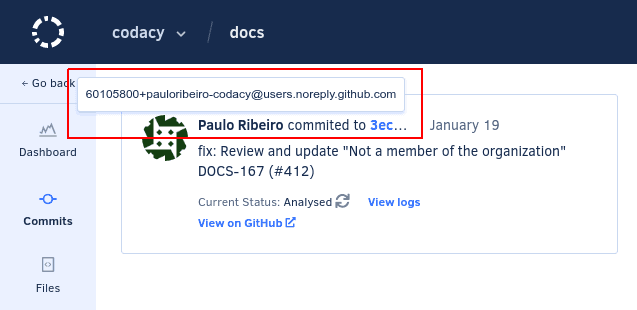
You can check which email address is associated with a commit by hovering the cursor on the name of the committer on the page for the commit:
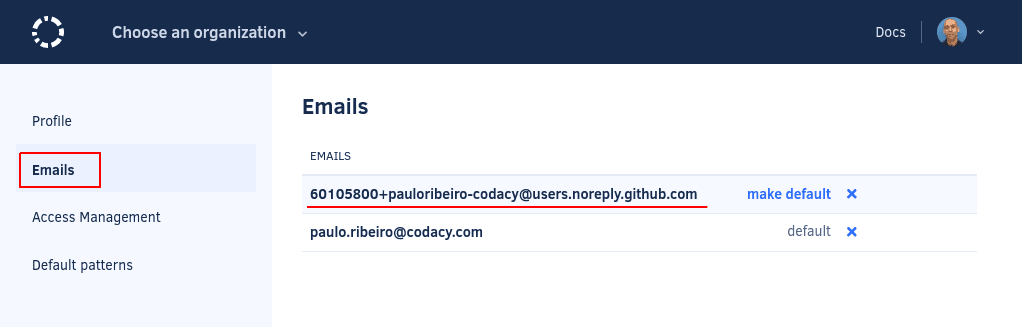
To verify which email addresses are associated with the Codacy Cloud account, the user must click on their avatar on the top right-hand corner, select Your account, and open the page Emails:
There may be different reasons for this issue to happen:
-
The user making the commit hasn't signed in to Codacy Cloud and joined the organization yet
The user must join the organization or, if you're the organization admin, you can add the user instead.
-
The commit email address isn't associated with the account of a Codacy Cloud user
Make sure the user updates the email addresses associated with their Codacy account to include the missing commit email address.
-
Git isn't configured with the correct email address
Make sure the user sets the Git email address correctly.
Was this page helpful?
Your feedback helps us improve the documentation.
255 characters left
Thanks for helping improve Codacy documentation.
For more detailed feedback, open an issue on GitHub.